Software SBC Benefits: Why Choose a Software Session Border Controller
For most of the last two decades, buying a session border controller meant buying a box. You picked a chassis, sized it for peak load, racked it, and lived with that capacity ceiling until the next hardware refresh. That model still exists, but it is no longer the default. The same border functions now run as SBC software on a virtual machine, a cloud instance, or a bare-metal server you already own.
The confusion worth clearing up first: an SBC is a set of functions, not a physical object. Signaling control, media handling, encryption, topology hiding, and fraud protection are all software. A hardware appliance is just that software welded to a fixed piece of tin. Once you separate the function from the tin, the real question stops being “which box” and becomes “where do I want to run this, and how do I want to pay for it.”
Here’s what we’ll walk through: what a software session border controller actually is, how a virtual SBC differs from a hardware appliance in practice, where each one still makes sense, and the specific things to check before you commit. If you’re an engineer or network architect sizing your next deployment, or an MSP or ISP deciding whether to keep buying appliances, this is written for that decision.

What Is a Software Session Border Controller?
A software session border controller is the full set of SBC functions delivered as an installable product instead of a sealed appliance. You take the software, put it on infrastructure you control, and it does everything a border controller is supposed to do: it terminates SIP on both legs as a back-to-back user agent, encrypts signaling and media, hides your internal topology, filters malicious traffic, and routes calls between networks that would otherwise refuse to talk to each other.
The key point is that none of those functions requires custom silicon. Terminating a SIP dialog is software. Rewriting a header is software. Negotiating TLS and converting RTP to SRTP is software. A hardware appliance runs the same logic; it just runs it on a board the vendor chose for you and sells you as a unit. When the SBC is software, you choose the board, or the VM, or the cloud region, and you can change that choice later without replacing the product.
That decoupling is what people mean when they say virtual SBC software. A virtualized SBC runs inside a hypervisor like VMware or KVM, or as a virtual network function on your own uCPE. A cloud-native SBC runs as an instance in AWS or Azure. Both are the same software; the difference is only where the packets are processed. To be clear, “virtual,” “cloud,” and “software” describe deployment targets for one product, not three separate products.
Software SBC vs Hardware Appliance: The Real Differences
The two do the same job at the SIP border. Where they diverge is in how you buy, scale, deploy, and pay for that job over time. Those differences decide which one fits your operation.
How You Buy and Pay
A hardware appliance is a capital purchase. You pay up front for a box sized to your projected peak, and that spend sits on the balance sheet whether the box is busy or idle. Software SBCs are typically licensed on subscription, which turns the same capability into an operating cost that tracks your actual session count. TelcoBridges is one of the few SBC vendors that publishes its per-session subscription rates openly and lets you buy without a sales call, so you can size the cost yourself against your session count on the ProSBC pricing page rather than waiting on a quote. For most small production deployments that lands well under a five-figure hardware order. If the cost math is your main question, the full hardware-to-software TCO breakdown goes deeper than we will here.
How You Scale
This is where the appliance model shows its age. A hardware SBC has a fixed ceiling, and reaching it means a forklift upgrade: buy the bigger box, migrate, decommission the old one. A software SBC scales with the resources you give the virtual machine, and when you need more, you add another instance. ProSBC handles up to 60,000 concurrent sessions and 350,000 endpoint registrations per server, so the practical ceiling is set by your infrastructure planning, not by a model number you picked two years ago.
Where It Runs
An appliance runs where you rack it. Software runs wherever your infrastructure lives, and that flexibility matters more than it sounds. If your voice platform is moving to AWS, the SBC moves with it. If a customer in a regulated market requires the SBC on their own premises for data-protection reasons, you deploy it there without changing products. ProSBC runs on VMware, KVM and Proxmox, AWS, Azure, and bare-metal servers, so the deployment target follows the requirement instead of the requirement bending to the hardware.
The One Place Hardware Still Leads
Honesty matters here, because this is the tradeoff that trips people up. Real-time transcoding of complex codecs at carrier scale is genuinely hardware-assisted work. Converting a mobile codec to G.711 for tens of thousands of concurrent calls leans on dedicated DSP silicon, and pure software struggles to match that density. ProSBC pairs with external hardware transcoding for that case rather than pretending software alone covers it. G.711 pass-through and lighter conversion run fine in software; heavy Opus or AMR transcoding at volume is where a hardware transcoding unit still earns its place.
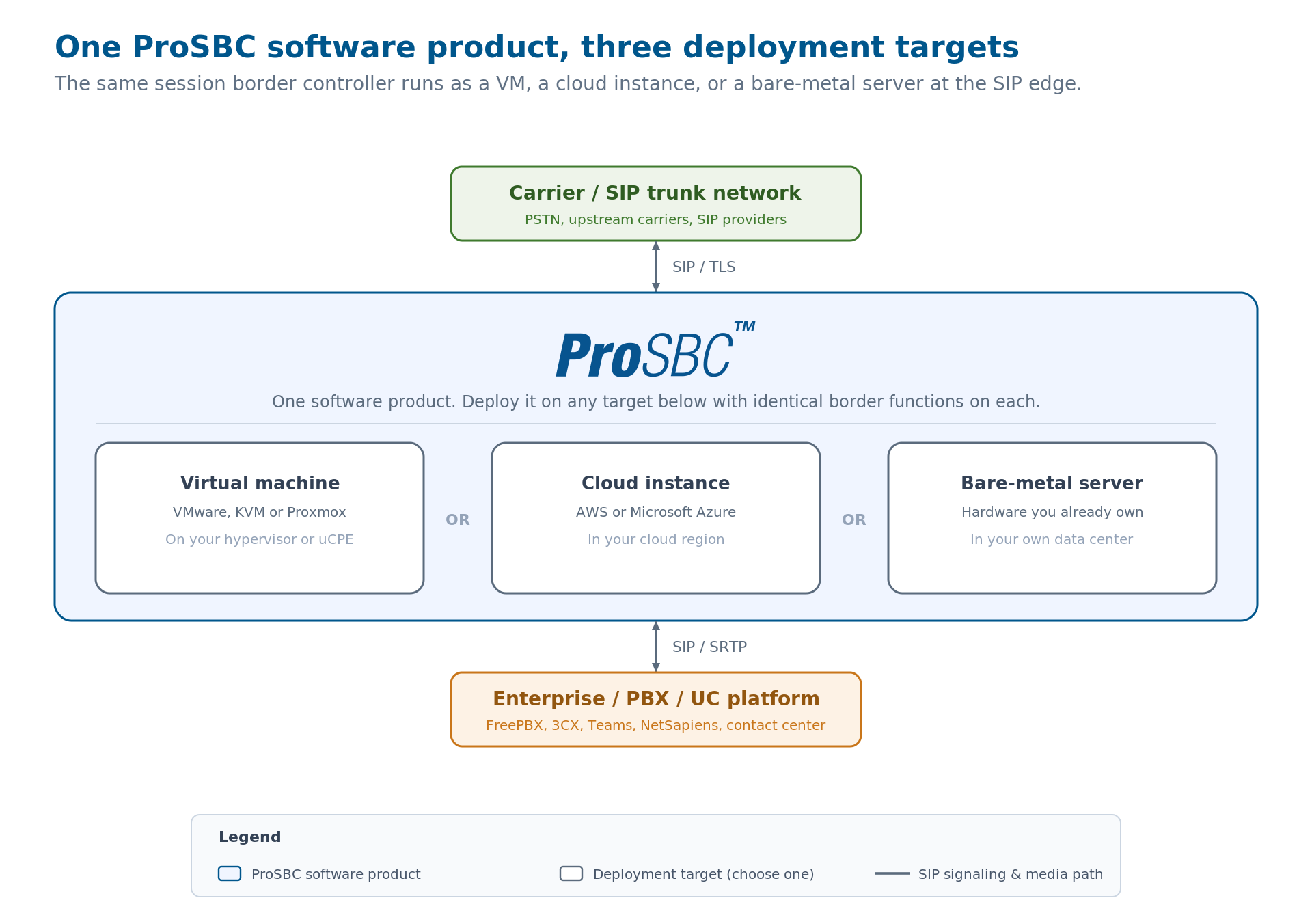
The same SBC software deployed three ways: as a virtual machine on VMware or KVM, as a cloud instance in AWS or Azure, and on a bare-metal server. Each sits at the SIP border between the carrier network and the enterprise or PBX side, doing identical border work. Click to enlarge.
How a Virtual SBC Works
A virtual SBC works exactly like a hardware one at the protocol level, so nothing about the call flow changes when you drop the appliance. The instance presents a public signaling address, terminates inbound SIP as a B2BUA, applies your security and normalization rules, and re-originates the call toward its destination. The carrier and the PBX on either side cannot tell whether the border controller in the middle is a box or a VM, and that is the point.
What changes is the operational surface underneath. Instead of a hardware watchdog and a vendor RMA process, you get the tools of the platform the software runs on. You snapshot the VM before a config change. You spin up a second instance for parallel migration and cut trunk groups over one at a time. You resize the instance when traffic grows. None of that is possible with a sealed box, and all of it lowers the risk of routine changes.
Configuration Is the Same Work
The configuration model does not simplify just because the SBC is virtual. You still define a NAP for each carrier and each internal system, set transport and codec behavior per NAP, and write routing rules between them. On ProSBC this is where the Ruby-based routing engine earns its keep, exposing call parameters to routing scripts so you can do least-cost routing, fraud lookups, and STIR/SHAKEN integration in the same call flow. The software being virtual does not remove that work; it just means the platform you run it on is yours to manage.
When to Choose Software Over a Hardware Appliance
The theoretically-correct answer is that software wins on flexibility and cost almost everywhere. The operationally-useful answer is narrower, because a few real situations still point at hardware. Match your case to the honest version below.
Software SBC Is the Right Call When
- Your platform is cloud-bound or already virtualized. If your voice infrastructure lives in AWS, Azure, or a VMware and KVM estate, a software SBC deploys alongside it with no separate hardware lifecycle to manage.
- You need to scale in steps rather than leaps. Subscription licensing and per-instance scaling let capacity follow demand, instead of committing to a hardware ceiling you hope to grow into.
- You are replacing an aging or end-of-life appliance. Ribbon, Oracle Acme Packet, and legacy platforms hit by rising virtualization licensing costs are common triggers for moving the border function into software.
- You are an MSP or ISP serving many tenants. One software instance with a high trunk-group count centralizes what used to take a rack of boxes, and it deploys per customer when a tenant needs isolation.
A Hardware Appliance or Hybrid Still Fits When
- You need heavy codec transcoding at carrier density. High-volume conversion of Opus, AMR, or G.729 leans on dedicated DSP hardware, so a software SBC paired with a hardware transcoding unit is the right shape rather than software alone.
- A procurement or compliance rule mandates a physical appliance. Some environments still require a sealed, vendor-supported box, and that constraint decides the question regardless of the technical merits.
What to Check Before You Commit to a Software SBC
Not all SBC software is equal, and the differences that matter are easy to miss on a datasheet. Before you commit, confirm these directly against your own numbers rather than the vendor’s headline spec.
B2BUA Architecture, Not a Proxy
Confirm the software is a true back-to-back user agent and not a dressed-up SIP proxy. Only a B2BUA fully terminates and re-originates each call, which is what lets it rewrite headers, hide topology, and encrypt each leg independently. A proxy cannot do that work no matter how it is packaged.
Capacity Against Your Real Traffic
Size against measured load, not rated maximums. Pull your peak concurrent sessions and your CPS from real CDRs, because a contact-center dialer can stress CPS long before it approaches the session ceiling. Then confirm the software hits those numbers on the specific server or instance type you plan to run, since a software SBC’s capacity is a function of the resources you give it.
Security at the Edge
The SBC is internet-facing, so its edge security is not optional. Check for SIP over TLS, SRTP media encryption, built-in DoS and DDoS mitigation, dynamic blacklisting, and registration-scanning protection. These belong in the product, not bolted on afterward.
High Availability on Standard Infrastructure
Confirm the software supports 1+1 high availability on ordinary VMs, not only on a premium hardware tier. ProSBC offers active/standby HA even on small deployments, which gives maximum uptime and minimal downtime. One note worth being precise about: 1+1 HA minimizes downtime, but it does not guarantee zero call loss on failover, so plan for a brief interruption rather than assuming calls survive untouched.
An Honest Path for Transcoding
If your traffic includes complex-codec conversion, confirm how the vendor handles it. Software-only transcoding is fine for G.711, but heavier work needs a hardware transcoding path, and a straight answer on that boundary tells you whether the vendor is being realistic about software’s limits.
Frequently Asked Questions
What is the difference between SBC software and a hardware SBC?
They perform the same border functions. SBC software is an installable product you run on a virtual machine, a cloud instance, or a bare-metal server you choose, while a hardware SBC is the same software sold as a fixed physical appliance. The functional difference is zero; the practical difference is in how you buy, scale, deploy, and pay for it.
Is a virtual SBC as secure as a hardware appliance?
Yes. SIP over TLS, SRTP media encryption, DoS and DDoS mitigation, dynamic blacklisting, and topology hiding are all software functions that run identically whether the SBC is virtual or a box. Security depends on the SBC’s feature set and configuration, not on whether it ships as hardware.
Can a software SBC handle carrier-scale traffic?
Yes. A carrier-grade software SBC such as ProSBC handles up to 60,000 concurrent sessions and 350,000 endpoint registrations per server. The practical ceiling is set by the infrastructure you assign and by adding instances, rather than by a fixed hardware model.
When does a hardware SBC still make sense?
Mainly for high-volume transcoding of complex codecs, which leans on dedicated DSP silicon, and for environments where procurement or compliance rules mandate a physical appliance. In the transcoding case, a common shape is a software SBC paired with a hardware transcoding unit rather than a full hardware appliance.
Can I try a software SBC before buying?
Yes. ProSBC offers a permanently free, three-session lab license for testing and proof-of-concept work, set up in about twenty minutes, plus a 30-day free trial for commercial evaluation. Because it is software, you deploy it in a VM or cloud instance with no hardware to order first.
Conclusion
The move from appliance to software is not a leap of faith, because the border functions are identical on either side. Once you accept that an SBC is software wearing a chassis, the decision comes down to where you want to run it, how you want to scale it, and how you want to pay. For most cloud-bound, virtualized, or multi-tenant deployments, software wins on all three. The honest exceptions are heavy carrier-scale transcoding and hard procurement mandates, and both have clear answers rather than hand-waving.
The practical next step is to size against your real traffic and test on the infrastructure you actually plan to use. A software SBC lets you do exactly that before you commit a dollar, which is the biggest advantage the appliance model never had.
Run a Software SBC on Your Own Infrastructure with ProSBC
ProSBC is a carrier-grade software session border controller built on over 20 years of SIP deployment experience. It runs as a full B2BUA on VMware, KVM and Proxmox, AWS, Azure, or bare metal, scaling to 60,000 concurrent sessions and 350,000 registrations per server, with SIP over TLS, SRTP, DoS and DDoS protection, dynamic blacklisting, and topology hiding included in every deployment.
Licensing is a transparent, publicly listed subscription, so a production deployment is an operating cost that tracks your session count rather than a hardware order, and you can check the current per-session tiers yourself on the pricing page. When you need heavy codec conversion, ProSBC pairs with a hardware transcoding unit, and when you would rather not run it yourself, a fully managed service option is available.
Prefer to evaluate on your own first? Start your 30-day free trial.